Di466 - Flash NISSIN - Free user manual and instructions
Find the device manual for free Di466 NISSIN in PDF.


User questions about Di466 NISSIN
0 question about this device. Answer the ones you know or ask your own.
Ask a new question about this device
Download the instructions for your Flash in PDF format for free! Find your manual Di466 - NISSIN and take your electronic device back in hand. On this page are published all the documents necessary for the use of your device. Di466 by NISSIN.
USER MANUAL Di466 NISSIN
for Four Thirds/Micro Four Thirds
INSTRUCTION MANUAL
DIGITAL TTL POWER ZOOM FLASH
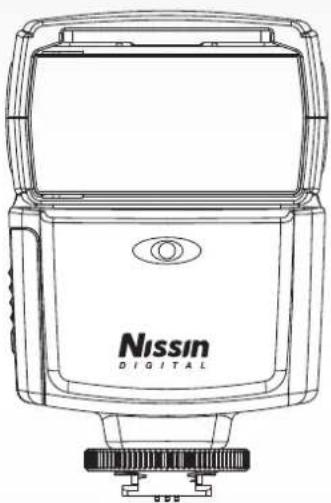
natural_image
Line drawing of a Nissan digital camera with no text or symbols on the device bodyNISSIN.JAPAN
Nissin
Nissin Japan Ltd., Tokyo
http://www.nissin-japan.com
Nissin Marketing Ltd., Hong Kong
http://www.nissindigital.com
Design and Specifications are subject to change without prior notice.
466FT.Rov0310.1.2
Nissin Di466 Four Thirds / Micro Four Thirds version has been developed for digital SLR and (Micro) Four Thirds system cameras with hotshoe and the latest TTL flash control technology. Note: No film camera can be used with Di466 Four Thirds.
Attach Di466 Four Thirds to your camera, and then almost all jobs are controlled by the camera for the most proper exposure. Read this instruction manual and refer your camera owner's manual to enjoy flash photography.
Read this instruction manual and refer your canera owner's manual to enjoy flash photography.
The compatibility list of Di622 Mark II, please check at our official website: www.nissindigital.com

WARNING
This sign refers the danger or serious damage.
- The flash unit contains high voltage electric parts. Do not try to open or repair the flash unit. Return it back to the repair service station or the store you bought it.
- Do not touch the inside parts from the opening when the unit was dropped and broken.
- Do not fire the flash direct to the eye at short distance. It may damage the eye. When taking flash picture especially toward a baby, it is recommended to keep the flash unit at least 1 meter (3.3 feet) away from the subject.
- Or use diffuser or bounce the light to the ceiling or to the wall to soften its intensity.
- Do not use the flash unit in the flammable gas, chemicals or such liquids. It may cause fire or electric shock.

CAUTIONS
This sign refers the damage or defect.
- Do not leave or store the flash unit in the temperature over 40°C, such like in the automobile.
● The flash unit is not water resistant. Keep the unit away from rain, snow and humidity. - Do not use benzene, thinner or other alcoholic agents to clean the unit.
- Do not use this flash with the cameras which is not listed in the compatibility list at our official website, otherwise it may damage the camera's circuitry.
- Remove the batteries when not in use for a longer period of time.
Nomenclature

text_image
Filter guide Nissin 3.0174① Fill-in reflector
② Light diffusing panel
③ Wireless flash sensor
4 Flash head
⑤ AF-assist light
⑥ Lock ring
⑦ Mounting foot
8 Hotshoe contacts
⑨ Battery magazine

text_image
45° 60° 75° 90° PowerZoom 12-32 mm M3/10/1 Pilot On/Off + - EVI Fo10 Digital Camera 12 13 14 10 11 rFlash stand
10 Pilot lamp (Test flash button)
⑪ On / Off switch (Press button)
⑫ Mode select button / indicator
(TTL→Manual→Slave 1→Slave 2)
13 Flash power level indication lamps (6 LEDs)
14 Flash power level select button
Accessories: Flash stand, Pouch
Mounting Di466 Four Thirds on the Camera
- Turn the lock ring to loosen it as shown in the picture.
- Slide the mounting foot of Di466 Four Thirds into the hotshoe of camera.
- Turn the lock ring to opposite direction and tighten it.
- Lock pin comes out to hook the foot at the hotshoe for sure contact.
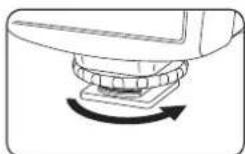
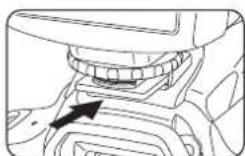

Removing Di466 Four Thirds from the Camera
- Loosen the lock ring and slide the mounting foot of Di466 Four Thirds off the hotshoe of the camera. Make sure to turn the lock ring all the way to completely clear the lock pin off the hooking slot on the hotshoe.
NOTE
- Before mounting or removing Di466 Four Thirds into or from the camera, it is recommended to turn off the power switch of both Di466 Four Thirds and the camera.
Basic Operation
Inserting batteries
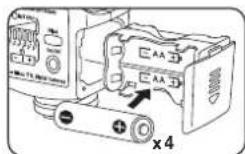
- Remove the battery magazine and insert 4 x size AA batteries as shown in the picture.
● The battery compartment is designed so that each cell is placed in same direction to avoid the confusion in poor light situation. -
- / - symbol is clearly marked at the battery compartment.
- Place the battery magazine back into the body.
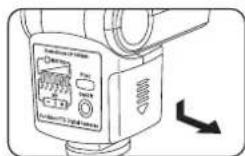

NOTE
It is recommended to use all 4 batteries in same brand and type, and replace them all at the same time. Wrong insertion of each cell does not make electric contact.
Turn on the flash unit
- Press the On / Off switch and Pilot lamp turns red showing the unit is turned on.
- In a few seconds, the Pilot lamp turns green. Di466 Four Thirds is ready to shoot.
- For a test flash, press the Pilot lamp. When using the test flash as an open flash, please note that the reference guide number in this case is G.No.10 (ISO 100).
- To turn off the flash unit manually, press the On / Off switch for 2 seconds.

Di466 Four Thirds has energy saving double power off function.
To save battery energy, the power is automatically turned off (to stand-by mode), both in TTL mode & Manual Power mode, in about 2 minutes of idle use.
While Di466 Four Thirds is in the stand-by mode a Pilot lamp blinks every 2 seconds showing the flash unit is in stand-by mode.
To turn on Di466 Four Thirds again, press the camera's shutter button halfway or press any button of the flash unit.
In case Di466 Four Thirds is not in use over 30 minutes, the unit is completely turned off and shut out the current leakage from the batteries.
To turn on Di466 Four Thirds again, take the first step of turning the flash unit on.
In case of using Di466 Four Thirds as a slave flash (at slave mode*5), Di466 Four Thirds will not go into the stand-by mode. It will however automatically turn off when not used over 60 minutes.
*5: Slave mode : Refer instruction below.
Shooting Di466 Four Thirds automatically
Olympus cameras
Panasonic cameras
In all camera's shooting mode listed above, Di466 Four Thirds will fully work in TTL automatic-flash system.
- Set Di466 Four Thirds to the camera's hotshoe and turn on the power switch.
- Di466 Four Thirds is automatically set for the camera's TTL mode when ready lamp lights up.
- Press the shutter button of your camera halfway to focus the subject.
- Shutter speed, aperture and flash mark (⚡) are indicated in camera's view finder.
- Take the picture. Di466 Four Thirds is fired and the result is immediately shown on the camera's LCD display.
- When you change the focal length, The power zoom flash head of Di466 Four Thirds responds without delay and immediately sets its position to match the lens focal length you selected.
● The flash illumination coverage of Di466 Four Thirds responds to the lens focal length of 12 mm to 53 mm.
Set the camera's shooting mode, select focal length and take pictures with Di466 Four Thirds on your camera.
Di466 Four Thirds is a supplement to help your taking a creative and live picture. Almost all jobs are automatically done by the camera and you just control the camera only.
| Mode | Shutter Speed | Aperture Setting | Control on the camera | |
| Olympus | Panasonic | |||
| [IAUTO] | [iA] | Automatic | Automatic | Automatic |
| [P][P] | Automatic | Automatic | Automatic | |
| [S] | [S] | Manual | Automatic | Any available shutter speed can be set |
| [A] | [A] | Automatic | Manual | Any available f-stop speed can be set |
| [M] | [M] | Manual | Manual | Any shutter speed/f-stop combination can be set |
■ Joy of Flash Photography
TTL flash power compensation
With the latest TTL flash control system, the flash power level is always automatically controlled by the camera for the most appropriate exposure. You wish if you can soften or weaken the flash light, or give more light to the subject without changing the environmental or background exposure effect Di466 Four Thirds can make it possible quickly for each shot at respective occasion of flash picture.
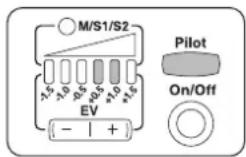
- TTL flash power compensation is provided in 7 steps by half Ev increment for -1.5, -1.0, -0.5, 0, +0.5, +1.0, and +1.5ev.
- Set the Flash power level select button to the power level you desire.
- When Di466 Four Thirds shows no level indication LED is turned, the flash power compensation level is at even(OEv) level as default value.
- Press the flash power select button, by each press of + marked knob, it sets the power of +0.5 +1.0 +1.5Ev . and the - marked knob sets it to -0.5 -1.0 -1.5Ev . The power level indication lamp shows the power level you set.
● Take a picture and the aimed subject is shown with required lighting effect by keeping the background exposure level as originally - On some cameras, the TTL flash power compensation setting is provided in its menu mode. When setting the TTL flash power compensation on your camera, the same of Di466 Four Thirds is, in this case, to be counted in addition to the compensation you selected in the camera's menu mode.
Fill-in flash and Light diffusing panel
For short distance or portrait flash photography, we wish if the light is not too sharp or too strong to the subject. Use fill-in reflector flash or diffuse the light.
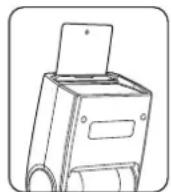
- If the subject is close (within 2 meters), turn the flash head 90 degrees upward and pull out the fill-in reflector as shown in the picture.
- Take a picture as usual. A blink of fill-in flash freshens up the subject in natural image.
- This small blink of flash is also useful when taking a picture of baby without scaring him.
- This technology is also useful to eliminate the shadow on the subject under the tree.
- For portrait photography, pull out the light diffusing panel and place it over the flash window as shown in the picture. The diffusing panel makes the flash light soften and creates a lively color effect on the subject.


- Since the light diffusing panel expands the lighting area, it covers the range of 9mm focal length lens.
Bounce Lighting
When taking a picture of a baby or small children, do not shoot the flash straight on to them. Bounce the light off the ceiling or wall so that it won't scare them. The lighting on a subject in front of the wall, creates an unnecessary sharp shadow on the wall resulting the picture disappointed. Bounce the light off the ceiling or wall to soften the light on the subject, and the shadow fade out.

text_image
90° Nissin● Turn the flash head upwards. It turns upward to 45 > 60 > 75 > 90 degrees.
- When the flash head stays at turning or tilting position, the zoom setting position of Di466 is automatically set at the position for 25 mm(50mm / film camera standard) focal
- The wall or ceiling in this case should be flat surface and white color is preferable. Colored ceiling or wall may reflect its color on the subject.
AF assist light emitter
Under the low light condition, in the dark place, AF assist light will automatically emit the beam and illuminate the subject, so that the camera can easily focus the subject in darkness. The beam is however not shown in the picture.
*Remark: Some camera models are originally programmed to disable the AF assist light function.
Flash mode setting
Setting Di466 Four Thirds as the external flash. The camera sets the flash mode according to various factors such as firing pattern and flash timing. Available flash mode depend on the exposure mode.
For Olmypus only
Following functions are available on Olmypus cameras. Refer to camera owner's manual for details.
Slow synchronization
The flash is controlled at a slow shutter speed to the correct exposure for both the main subject and back ground in low light conditions or at night.

Red-eye reduction flash
In the red-eye reduction flash mode, a series of pre-flashes are emitted just before the regular flash fires. This helps accustom the subject's eyes to the bright light and minizes the red-eye phenomenon.

Slow synchronization (2nd curtain)
2nd curtain flash fires just before the shutter closes. Changing the flash timing can create interesting effects in your picture. The slower the shutter speed, the better the effects turn out.

** 2nd-C for M and S mode ONLY
Slow synchronization / Red-eye reduction
While using slow synchronization with flash shooting, you can also use this function to achieve red-eye reduction. When shooting a subject against a night scene, this function allows you to reduce the red-eye phenomenon. As the time from emitting pre-flashes to shooting is long in 2nd curtain synchronization, it is difficult to achieve red-eye reduction. Hence, only 1st curtain synchronization setting is available.

For Panasonic only
Following functions are available on Panasonic cameras. Refer to camera owner's manual for details.
Slow synchronization
When taking pictures against a dark background landscape, this feature will slow the shutter speed when the flash is activated. Dark background landscape will appear brighter.

Slow synchronization (2nd curtain)
2nd curtain flash fires just before the shutter closes. Changing the flash timing can create interesting effects in your picture. The slower the shutter speed, the better the effects turn out.

Manual Exposure Flash
In some occasion, or for special expression, you may need your own flash exposure instead of automatic controlled exposure. You can set Di466 Four Thirds for non-automatic flash mode, and select the desired flash power from 6 different levels.
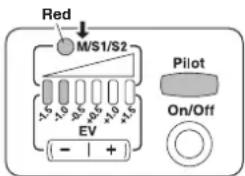
- When the flash unit is turned on, it is automatically set for TTL automatic flash mode. In this mode, the mode select indicator does not light.
- Press the mode select button.
● The color of mode select indicator turns to Red as shown in the picture.
- You can select the power, from the left to right,
- Set the camera shooting mode to either [A] or [M].
- Select your desired F-stop and /or shutter speed. Point the subject and press the shutter.
text_image
Red M/S1/S2 +5 -5 +5 +5 +5 -5 -5 +5 +5 EV (- | +) Pilot On/OffWireless Remote Flash
Di466 Four Thirds has a wireless remote flash system as a slave unit. You can enjoy creative flash photography with multiple lightings from the various directions. 2 slave modes are provided, Slave 1 (S1: color green) for digital pre-flash system and Slave 2 (S2: color blue) for analog flash system.
Slave 1: In this mode, Di466 Four Thirds synchronize to the pre-flash system. The master flash is to be set at TTL mode.
Slave 2: In this mode, Di466 Four Thirds synchronize to the traditional single flash system. The master flash is to be set at manual mode. Studio lighting system synchronizes to this mode. This mode is also available for
Setting master flash:
Place the master flash on the camera and switch it on. Or set the camera for flash mode to always fire the built-in flash.

natural_image
Line drawings of two DSLR cameras with different camera designs (no text or symbols)Setting slave flash Di466 Four Thirds:
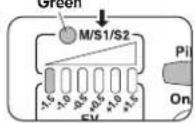
Switch Di466 Four Thirds on and while the ready lamp is on, press the mode select button to select S1(color turns Green) or S2(color turns Blue). The mode select button turns to TTL(nolight)—Manual(red)—S1(green)—S2(blue) and back to TTL.
When flash is set to either slave mode, the first lamp of Flash power level indication lamps is lighten. This lamp shows the 1/32 manual power level. Press the Flash power level select button at marked + to select different power of 1/16→1/8→1/4→1/2 and Full. Press the button at marked — to power downward. The power you selected is memorized and remains unchanged until the unit is switched off.
- Set slave flash at any place and direct the flash head as you desire. Slave sensor may not respond to the master flash in the extremely bright condition or under the poor sensing situation.

- Use the flash stand included. Place Di466 Four Thirds on to the flash stand which can be placed either on the flat place or on the tripod by the screw.
NOTE
Metal type accessory shoe is not recommended since it may give electric damage on the electrical contact of the flash hotshoe.
■ Shooting the subject:
Set the camera for flash shooting mode. Point the subject and shoot. The slave flash will synchronize to the master flash and gives additional lighting from the different direction you desired.
Energy saving system for stand by mode will not work when it's in slave mode. Automatic shut off function is however effect. It automatically turns off when not in use over 60 minutes.
The zoom setting position is automatically set for the focal length of 12mm while using Di466 Four Thirds as a slave unit.

text_image
slave 2 slave 1 slave 3 Camera with master flashTo reset the flash unit to the other mode, press the mode select button for TTL and or Manual mode.
TTL Exposure level custom setting
TTL exposure level is accurately calibrated for standard balance in accordance with Nissin's standard. If any adjustment is however required, or if you like to set your preferable level, it can be adjusted for about ±0.75 (3/4)ev. This adjustment can only be set when the flash is off. Insert the battery magazine with 4 batteries fully loaded as instructed above.
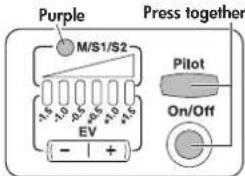
Press the pilot lamp and On/Off switch both together and hold for 3 seconds. The mode select lamp turns purple showing the unit is ready for TTL exposure level adjustment.
Press the power level select button either + or - to adjust it to the required exposure level. Each LED shows 0.25(1/4)ev increments and it can be adjusted up to +0.75(3/4)ev.(over exposure efficiency), or down to -0.75(3/4)ev.(under exposure efficiency). Press the On/Off switch for 3 sec. To turn the unit off. The adjusted level is memorized and kept as customized default TTL exposure level. This setting is permanently kept until you alter the setting to the other required level. Start to use flash unit from "Turn on the flash unit" at "BASIC OPERATION" explained as above.
text_image
Purple Press together M/S1/S2 -1.5 -1.0 -0.5 -0.5 -1.0 -1.5 EV - + Pilot On/Off
■ Specifications
| Usable cameras | Four Thirds and Micro Four Thirds system digital cameras |
| Guide No. | 33 / 108 at 53 mm focal length (ISO 100 m/ft) |
| Illumination coverage | 12 - 53 mm (9 mm with diffuse panel)(Automatically set for the lens focal length) |
| Power source | 4 x size AA batteries(Size AA Ni-MH or lithium batteries usable) |
| Battery life | 200-1500 flashes according to the mode(with alkaline batteries) |
| Energy saving | Come to Stand-by mode in 2 minutes, and Power off in 30 minutes after the power on or the last use of flash unit. |
| Recycle time | 4 seconds with fresh alkaline batteries |
| Flash exposure | Automatic exposure |
| TTL | |
| Manual exposure at 6 power level(See guide number table below) | |
| AF assist light | Effective range of approx. 0.7 to 6m / 2.3 to 20 ft. |
| Color temperature | 5600 K |
| Flash duration | 1/800 (full power flash) sec.1/800-1/20,000 (controlled flash) seconds |
| Wirless flash | Slave function with 6 power level(See guide number table below) |
| Dimensions | 67(W) x 105(H) x 95(D) mm / 2.6(W) x 4.1(H) x 3.7(D) inches |
| Weight | 230 g |
■ Guide Number table
Guide No. at manual exposure mode (ISO 100 in meters/feet)
| Zooming Position | Flash Power Level | |||||
| Full | 1/2 | 1/4 | 1/8 | 1/16 | 1/32 | |
| 12mm | 18/59 | 12.7/42 | 9/29 | 6.4/21 | 4.5/15 | 3.2/10 |
| 14mm | 20/65 | 20/65 | 10/33 | 7/23 | 5/16 | 3.5/12 |
| 18mm | 22/72 | 22/72 | 11/36 | 7.8/26 | 5.5/18 | 4/13 |
| 25mm | 24/79 | 24/79 | 12.7/42 | 9/29 | 6.4/29 | 4.5/15 |
| 35mm | 27/88 | 27/88 | 13.5/44 | 9.5/31 | 6.7/31 | 4.7/15.5 |
| 43mm | 30/98 | 30/98 | 15/49 | 10/33 | 7/23 | 5/16 |
| 53mm | 33/108 | 33/108 | 16.5/54 | 11/36 | 8/26 | 5.6/18 |
■ Trouble Shooting
The flash unit does not start charging.
● Batteries are not correctly installed
Install batteries to correct direction.
● Batteries are exhausted Replace the batteries if the recycle time
The flash unit does not fire.
●The flash unit is not firmly clipped on the camera
Mount the flash unit firmly on the camera's hot shoe.
●The flash unit is automatically powered off >>> Turn on the switch again.
The flash picture is overexposed or underexposed.
● A reflective object or strong lighting near the subject
Use manual exposure flash or an appropriate correction by the TTL exposure level custom setting.
●The unit is set for manual exposure mode >>> Set to TTL mode or other power level.
Warranty
In case of the following reason of the defect, it may void the warranty. Please refer the respective warranty condition for details which depend on the country by country.
- The product is not used in accordance with the instruction of the owner's manual.
- The product is repaired or modified by the one who is not an authorized repair service.
- When the product is used with the cameras not applicable, lens, adaptors or such accessories produced by the third party.
- Fault or defect cased by fire, earthquake, flood, public pollution and such natural accident.
- In case that the product is stored in dust, moisture, extremely high temperature or such poor condition.
- Scratch, blemish, crush or worn out by a violently use or treatment.
- Guarantee card without name of place purchased or date of purchase stamped, or no guarantee card.